
The Social Planner in Enrollio has been upgraded with two key enhancements — Media Optimization and Watermarking — to make posting across multiple platforms faster, easier, and more on-brand for your dance studio.
What’s New
Watermarking (Now on Mobile)
Apply your pre-configured watermark (set on desktop) to every image in your post.
Ensures consistent branding across platforms without manual edits.
Works across all images in a single post.
Media Optimization
Automatically resizes and formats your uploaded images to fit each platform’s requirements (Instagram, Facebook, LinkedIn, etc.).
Prevents cropping, rejection, or formatting issues.
Eliminates the need for third-party design or resizing tools.
How to Use These Features
Open the Social Planner in your Enrollio mobile app.
Start creating a new post and upload your media.
-
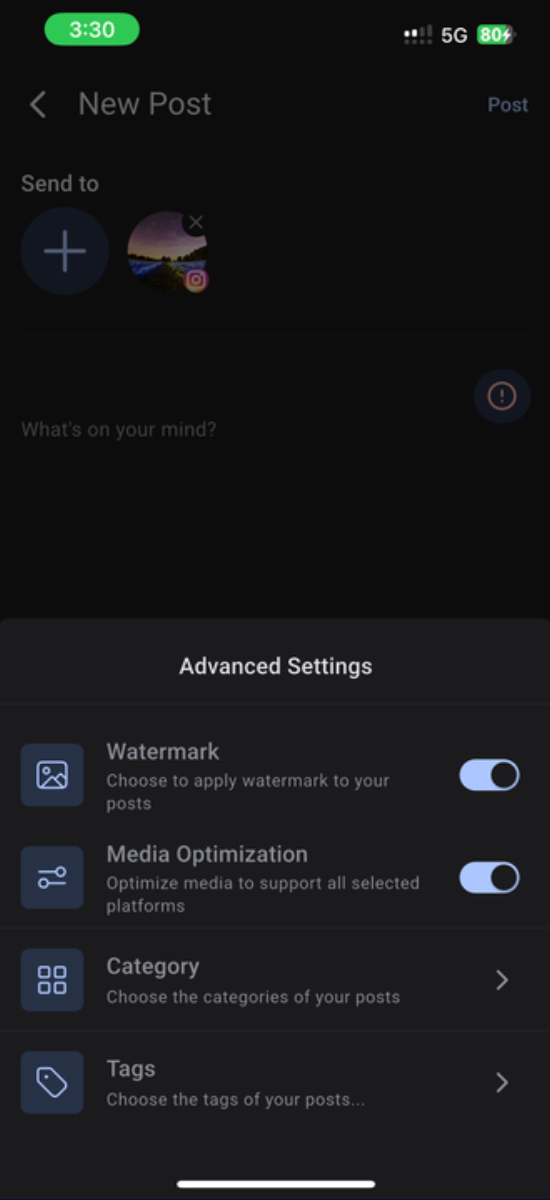
Under Advanced Settings, toggle on:
Watermark to apply your branding.
Media Optimization to auto-format for every platform.
Publish your post across channels with confidence.
Why This Matters for Dance Studios
Keep your studio’s brand consistent on every channel.
Post faster without spending time on manual edits.
Ensure your content looks polished and professional across platforms.
For any questions or support, please contact support@enrollio.ai