
Guide to Pre-Built Contact Segments
This guide shows you how to use pre-built contact segments to target your email campaigns more effectively. Instead of manually sorting through families, you can quickly send messages to specific groups based on how they've engaged with your emails.
Whether you're following up with prospective families, nurturing current enrollments, or re-engaging parents who've gone quiet, pre-built segments help you reach the right people with the right message.
What Are Pre-Built Segments?
Pre-built segments are predefined groups of contacts that automatically categorize families based on their email engagement. These segments save you time by organizing your audience without any manual work.
You can use pre-built segments to:
- Reach families who have actively engaged with your emails in the last 7, 30, or 60 days
- Target contacts who interacted with your last 5 email campaigns
- Re-engage families who haven't responded to recent emails
By targeting the right audience, your campaigns become more effective and you avoid overwhelming disengaged contacts.
Available Segments
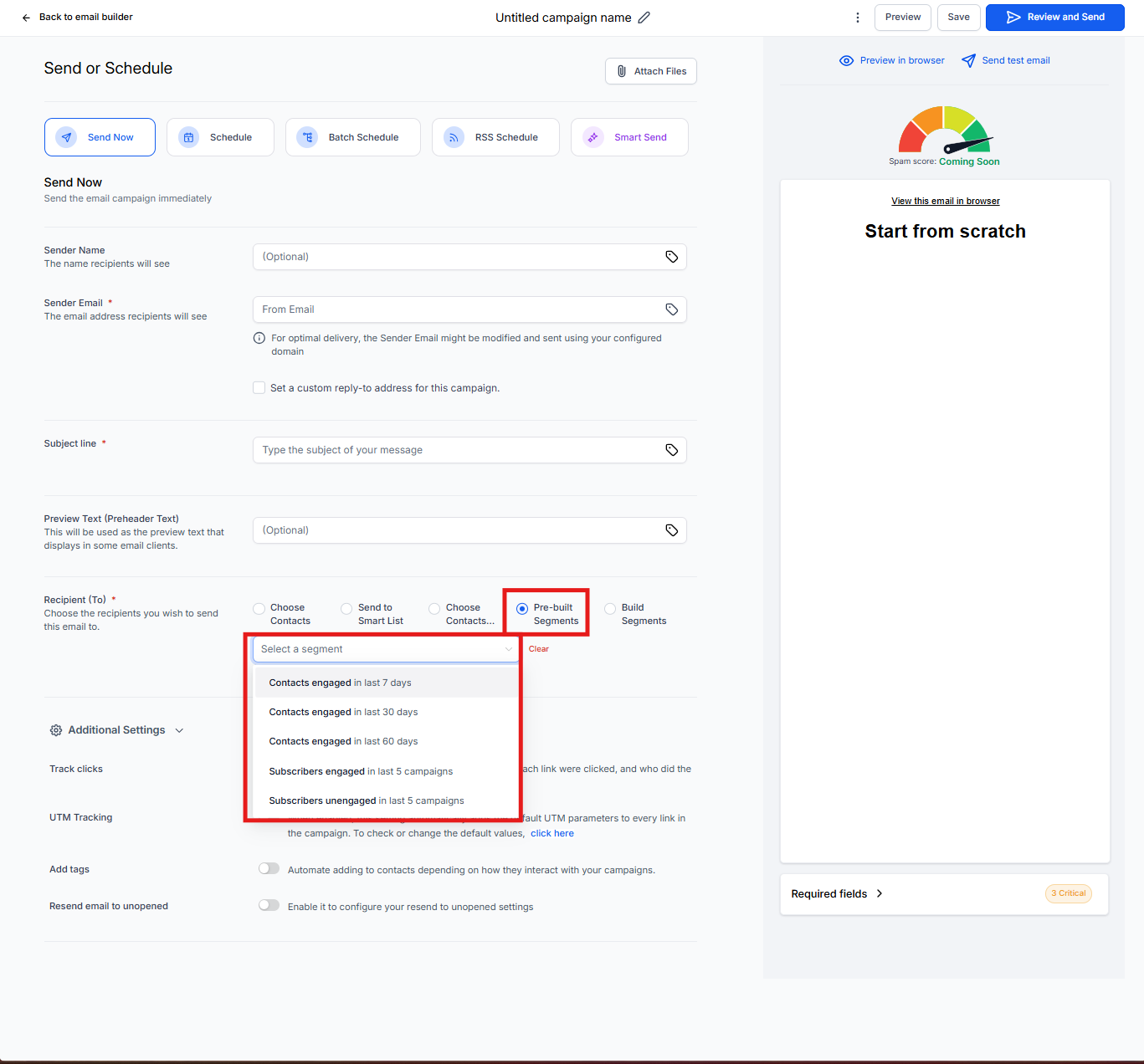
When you send or schedule an email campaign, you can choose from these pre-built segments:
- Engaged within last 7 days: Families who opened or clicked an email in the past week
- Engaged within last 30 days: Families who interacted in the past month
- Engaged within last 60 days: Families who showed interest in the past two months
- Interacted with last 5 campaigns: Families who opened or clicked at least one of your recent 5 campaigns
- Did not interact with last 5 campaigns: Families who haven't engaged with your recent emails
Note: "Engaged" means a contact opened or clicked on an email sent through automations, bulk actions, or email campaigns.
Why Use Pre-Built Segments
Targeted Messaging: Send relevant content to families who are actively interested in your center.
Better Retention: Create re-engagement campaigns for families who might be losing interest or considering other options.
Save Time: Focus your energy on engaged families instead of sending emails to everyone on your list.
How to Use Pre-Built Segments
Follow these steps to send an email to a pre-built segment:
- Go to Email Marketing → Campaigns
- Create a new campaign or select an existing one
- Click through to the send or schedule screen
- In the Recipient List section, select Pre-Built Segments
- Use the drop-down menu to choose your preferred segment
- Click Send Now or Schedule your email
Frequently Asked Questions
Can I create my own custom segments?
You can't create custom segments, but you can create smart lists under the Contacts page. Smart lists give you more flexibility to define your own criteria.
Can I modify the criteria of pre-built segments?
No, pre-built segments have fixed criteria. If you need different criteria, create a smart list that mimics the segment you want and adjust it to fit your needs.
How often are pre-built segments updated?
The segment is evaluated when you create or schedule your campaign. At that moment, Enrollio locks in the list of contacts who meet the criteria. The list won't change after scheduling, even if families engage with your emails before the campaign sends.
What's the difference between segments and smart lists?
Pre-built segments are quick, fixed filters for email engagement. Smart lists are customizable and can include any criteria you define—like enrollment status, tour dates, program interest, or custom field values.