
How to Use Enrollio AI to Book Tours and Appointments
Enrollio AI transforms how you handle parent inquiries and tour bookings. This intelligent assistant helps you respond faster, book more tours, and never miss an opportunity—even when you're busy with your current families.
Note: Enrollio AI pricing is $0.020 per message generated. This feature is available on select plans.
What is Enrollio AI?
Enrollio AI uses advanced technology to help you manage conversations with prospective families. It works in two modes:
Suggestive Mode (Available Now)
AI suggests responses in real-time as you chat with parents. You'll see suggested replies you can send as-is, customize, or skip. This helps you respond faster while keeping your personal touch.
Auto-Reply Mode (Limited Beta)
AI automatically responds to parent inquiries and guides them toward booking a tour. When a message comes in, the system waits 2 minutes (in case the parent sends multiple messages), then responds automatically. This mode is currently available to select beta testers.
Enrollio AI works across SMS, Facebook Messenger, Instagram DMs, and Google Business Messages. It uses the last 10 messages (up to 800 words) to understand context and provide relevant responses.
How Enrollio AI Helps Childcare Centers
Suggestive Mode Examples:
After-Hours Inquiries: A parent texts at 8pm asking about your toddler program. AI suggests a response with your program details and available tour times. You quickly customize it with a personal note and send.
Multiple Inquiries: Three families message during naptime asking about availability. AI helps you respond to each quickly with relevant information, so no one waits hours for a reply.
Tour Scheduling: When parents ask about visiting your center, AI suggests responses that include your tour calendar link, making booking instant.
Auto-Reply Mode Examples (Beta):
Weekend Lead Capture: A family finds you on Saturday and messages about infant care. AI responds with your program highlights and guides them to book a Monday tour—before they contact competitors.
After-Hours Engagement: Parents message at 7pm about preschool openings. AI provides availability, shares your program benefits, and sends a booking link. By morning, the tour is scheduled.
Staff Time Savings: Your front desk focuses on current families while AI handles initial inquiries from prospective families, qualifying them and booking tours automatically.
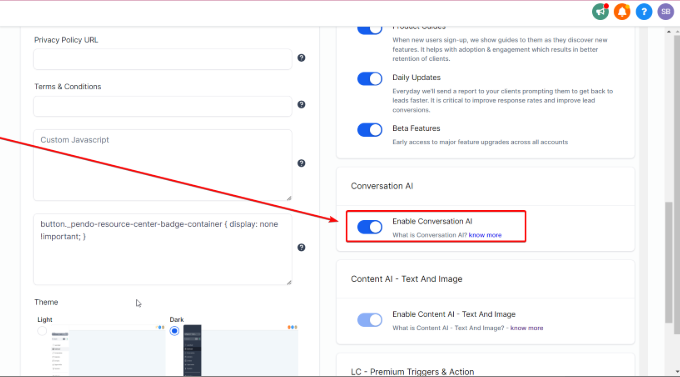
Enabling Enrollio AI
To turn on Enrollio AI:
- Click Settings in the left sidebar
- Select Company Settings
- Scroll down to find Enrollio AI
- Review the terms and pricing details
- Click Enable to activate the feature
Configuring Enrollio AI
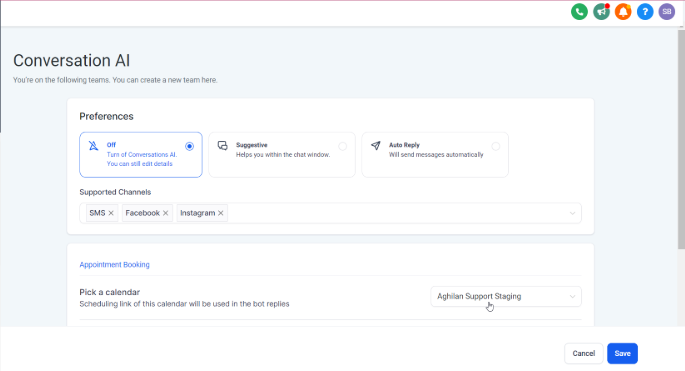
Once enabled, configure your AI settings:
- Go to Settings Enrollio AI
- Choose your preferred mode
AI Preferences
Off: Disables AI completely. You can still edit settings, but AI won't interact with parents.
Suggestive: AI suggests responses in your chat window. You see the suggestions and decide whether to use them. Perfect for when you want AI assistance while maintaining full control.
Auto-Reply (Beta): AI automatically responds to parent messages and guides them toward booking tours. The system handles initial conversations without your intervention.
Supported Channels
Enrollio AI works on:
- SMS text messages
- Facebook Messenger
- Instagram Direct Messages
- Google Business Messages
Enable AI for the channels where you communicate with prospective families most.
Tour Booking Setup
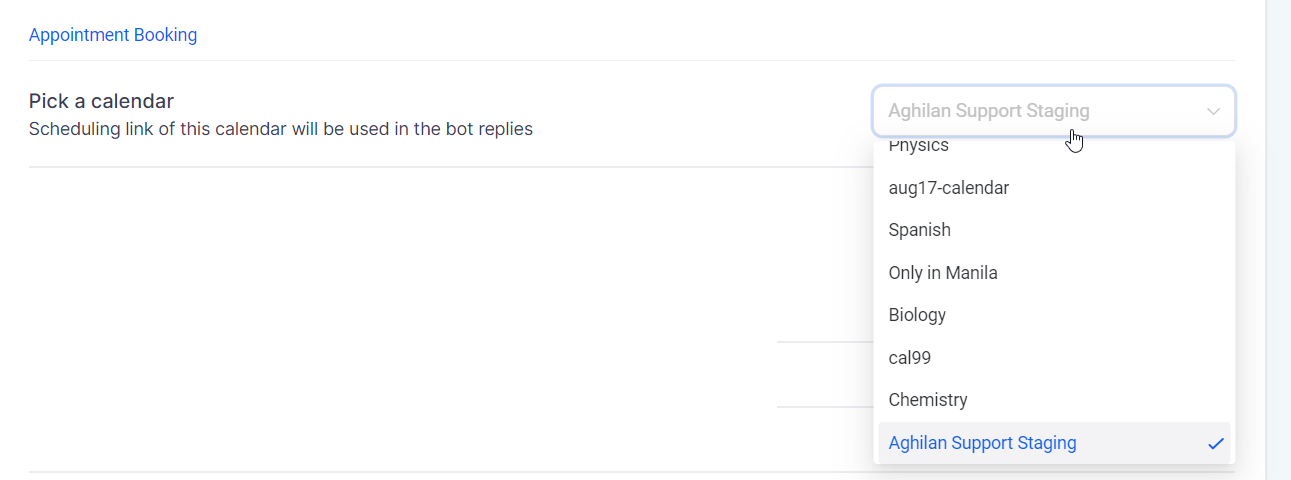
Connect your tour calendar so AI can share available times and booking links:
- In Enrollio AI settings, scroll to Appointment Booking
- Click Pick a Calendar
- Select your tour calendar from the dropdown
- Save your settings
Now when parents ask about visiting, AI can share real availability and send booking links.
Customize Bot Responses
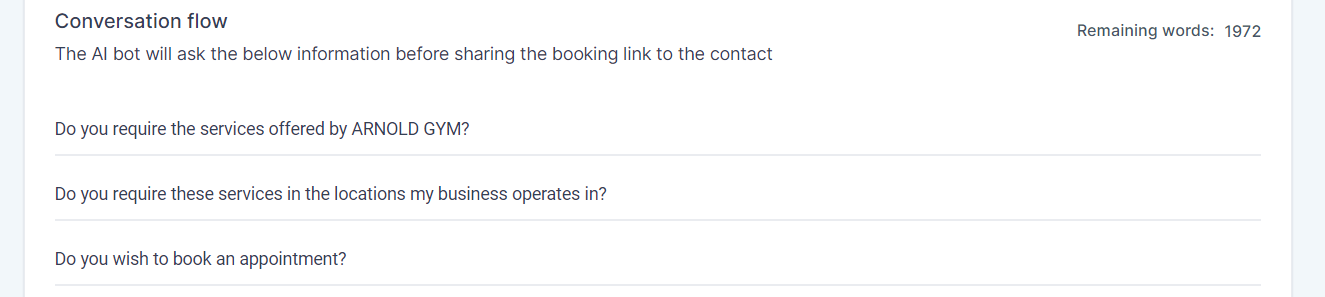
Personalize how AI sounds when representing your center:
- In Enrollio AI settings, find Conversation Flow
- Edit greeting messages to match your center's voice
- Add specific details about your programs, hours, or policies
- Set how AI handles questions it can't answer
- Save your changes
Pro Tip: Include your center's unique qualities in the AI responses—like "We're a nature-based program" or "We offer Spanish immersion." This helps parents immediately know if you're the right fit.
Using Enrollio AI in Conversations
Suggestive Mode
When a parent messages you:
- Open the conversation in your inbox
- AI analyzes the message and suggests a response
- Review the suggestion
- Click to send as-is, edit before sending, or dismiss
- Continue the conversation naturally
AI continues suggesting responses throughout the conversation, learning from your center's context.
Auto-Reply Mode (Beta)
In auto-reply mode, AI handles conversations automatically:
- Parent sends initial message
- System waits 2 minutes for additional messages
- AI responds automatically with relevant information
- AI guides the conversation toward booking a tour
- When appropriate, AI sends your tour booking link
You can jump into any conversation at any time. When you send a message manually, AI pauses to let you take over.
When AI Stops Responding
Enrollio AI automatically pauses in these situations:
- You manually send a message (you're now handling the conversation)
- Parent asks questions outside AI's scope
- Tour booking link has been sent
- Conversation goes off-topic
This ensures AI never continues a conversation when human intervention is better.
Frequently Asked Questions
Can Enrollio AI share available tour times?
Yes, when you connect your tour calendar, AI can tell parents which times are available and send booking links directly.
Is Auto-Reply Mode available to everyone?
Auto-Reply Mode is currently in limited beta. Suggestive Mode is available to all users on eligible plans. Contact support if you're interested in beta testing auto-reply.
What are the benefits of Suggestive Mode?
Suggestive Mode helps you respond faster while maintaining control. You get AI assistance without giving up your personal touch. It's perfect for busy directors who want help but prefer to review messages before they're sent.
Can I use Enrollio AI on multiple channels?
Yes, Enrollio AI works across SMS, Facebook Messenger, Instagram DMs, and Google Business Messages. Enable it on the channels where prospective families contact you most.
How does Enrollio AI handle questions it can't answer?
When AI receives questions outside its scope or gets confused, it stops responding and flags the conversation for your attention. This prevents incorrect or confusing responses to parents.
Does AI remember previous conversations?
AI uses the last 10 messages (up to 800 words) to understand context. This helps it provide relevant responses based on what's already been discussed with each family.
How much does Enrollio AI cost?
Enrollio AI costs $0.020 per message generated. For example, $10 generates approximately 145 AI messages. You're only charged when AI creates a message, not for every incoming message.