
What is the Rename Standard Objects Feature?
Enrollio lets admins customize how the three core CRM objects—Parents/Families, Enrollment Opportunities, and Companies—appear throughout the platform. You can relabel them with words that match how your childcare center actually talks about these records (for example, "Families," "Enrollments," or "Organizations").
These changes are purely visual. The underlying data structure stays exactly the same, so all your automations, reports, and integrations keep working without interruption.
Why Rename Standard Objects?
- Business-aligned language: Match the terms your team already uses every day.
- Faster adoption: Staff recognize familiar labels and start using the CRM confidently.
- Easier onboarding: New team members understand the system immediately.
- Clearer reporting: Dashboards and filters read naturally for your childcare business.
- System-safe changes: Display names update everywhere without touching your underlying data.
- Consistent everywhere: One change updates navigation, filters, automations, dashboards, and Enrollio AI.
- Terminology consistency in Enrollio AI: Your AI assistant uses your custom names when communicating with families and staff.
How to Rename a Standard Object
Note: Only admins with access to Settings → Objects can rename standard objects. All other users will see the new names but can't change them.
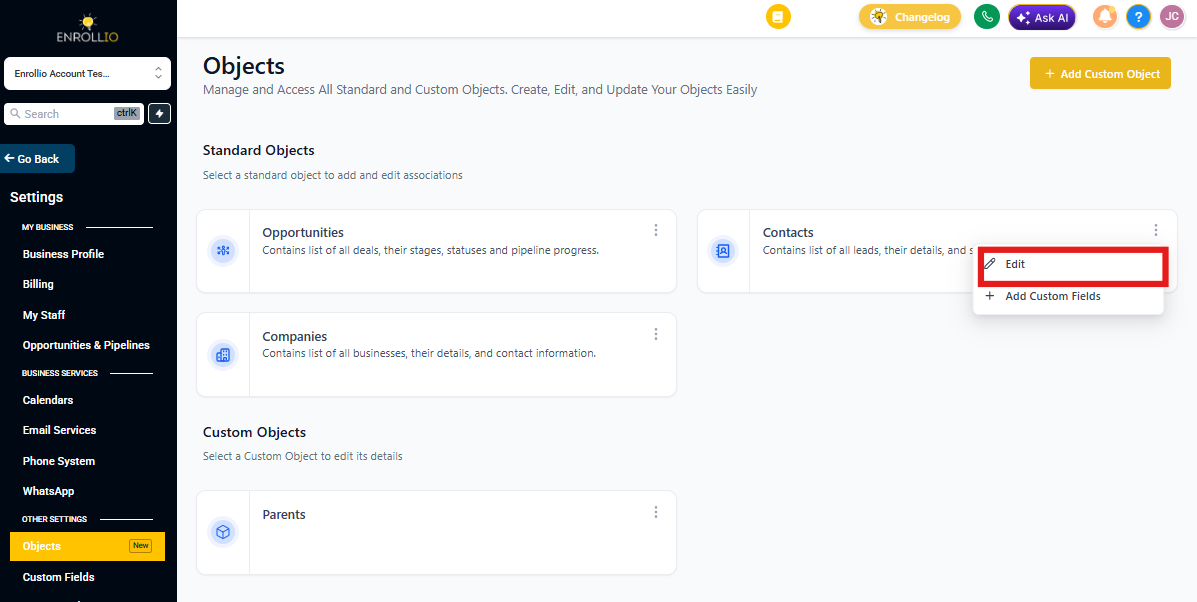
- Go to Settings.
- Click Objects.
- Click the three dots next to the object you want to rename (for example, Parents/Families).
- Click Edit.
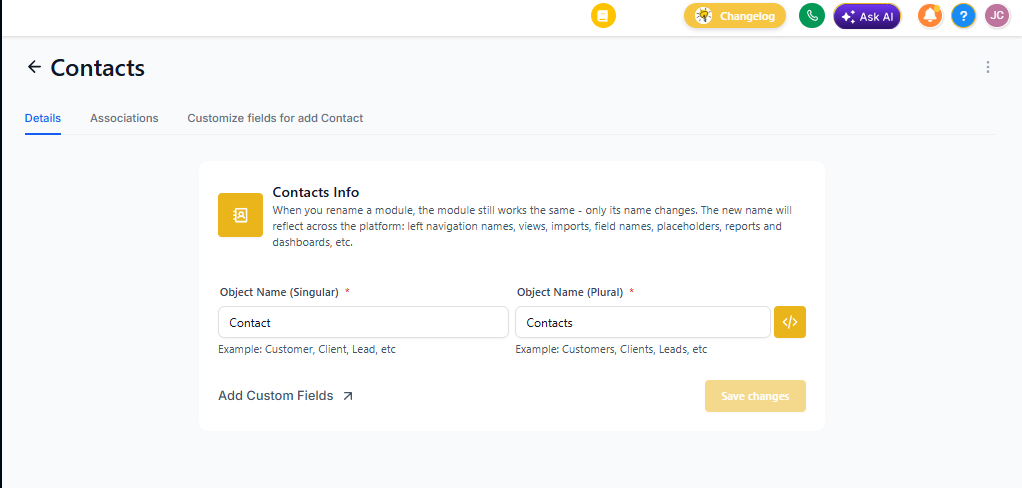
- Under the Object Name section, update:
- Singular Name → Appears on individual records
- Plural Name → Appears on list views and filters
- Click Save Changes.
Note: Enrollio AI pulls these custom names automatically. Changes typically appear immediately after you save.
The new names will automatically update across:
- Navigation menus
- Filters and smart lists
- Reports and dashboards
- Related features and modules
Naming Rules & Limitations
- You can rename all standard objects (Parents/Families, Enrollment Opportunities, Companies).
- Maximum length: 50 characters for both singular and plural names.
- Names must be unique — no two objects can share the same singular or plural name.
- Internal object keys remain unchanged to ensure backend stability.
- Renaming changes display labels only. Internal keys and API fields stay the same.
- Merge field names remain unchanged.
Examples
| Original Object | New Singular Name | New Plural Name |
|---|---|---|
| Parents/Families | Family | Families |
| Enrollment Opportunities | Enrollment | Enrollments |
| Companies | Organization | Organizations |
Frequently Asked Questions
Will changing object names break my automations or integrations?
No. The internal object keys remain the same—only the display labels change. Your automations and integrations continue working exactly as before.
Can two objects share the same name?
No. Each singular and plural label must be unique across your account.
Who can rename objects?
Only admins with access to Settings → Objects. Regular users will see the updated names but can't edit them.