
Overview
The Contact Deduplication settings control how Enrollio handles duplicate parent and family records in your system. Configure these preferences to match how you want new submissions from forms and Facebook/Instagram conversations to create or update existing records.
When turned off, Enrollio uses your chosen primary field (email or phone) to match new submissions with existing records — preventing duplicates and keeping parent information in one place. When turned on, new records can be created even if that email or phone already exists, allowing you to merge them later if needed.
Key Things to Know
Applies to Forms and Social Media
This setting controls how new submissions from your enrollment forms and Facebook/Instagram conversations create or update parent records. When enabled, new records are created even if the email or phone already exists. When disabled, matching details update the existing parent record instead of creating a duplicate.
CSV Imports Work Differently
When importing parents via CSV, Enrollio automatically merges records based on phone numbers or email addresses — regardless of this setting. Duplicate records cannot be created through CSV uploads.
Default Import Behavior
During CSV imports, the system checks for existing records using your specified primary field (email or phone). Parents with matching information are merged automatically, keeping your database clean and organized.
Contact Deduplication Settings
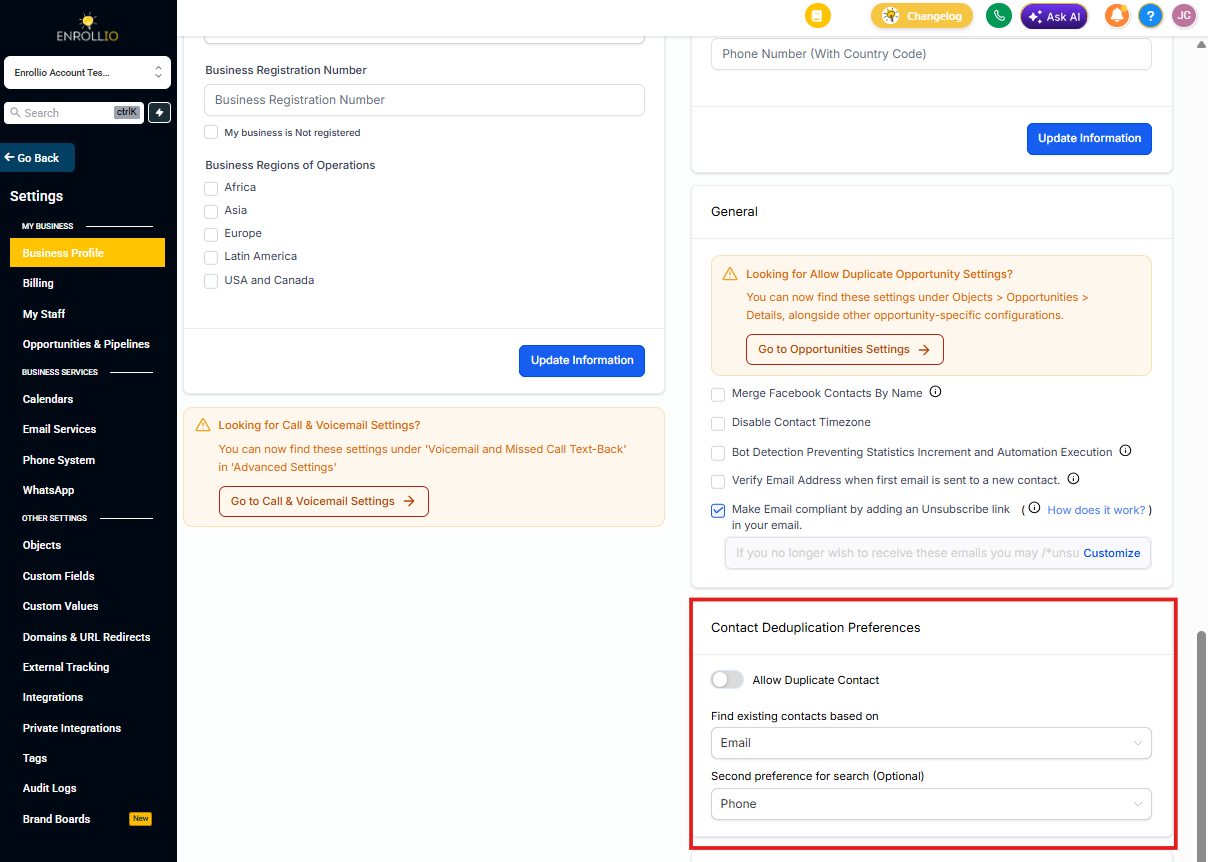
There are three settings you can configure:
Allow Duplicate Contacts
This controls how your account treats duplicate parent records. Toggle ON to allow duplicates (useful if the same person needs separate records for different children or programs). Toggle OFF to prevent duplicates and keep a single record per phone or email.
Find Existing Contacts Based On
Choose the primary field Enrollio uses to match existing parent records before creating new ones. Your options are Email (default) or Phone. Pick the field you collect most consistently during inquiries and tours.
Second Preference for Search (Optional)
Add a secondary field for duplicate detection. Leave blank if you only want to match on one field.
Example: If you select Email as primary and Phone as secondary, Enrollio will first match by email. If no match is found, it checks by phone number.
How It Works Across Different Sources
Forms
Duplicates Enabled: Creates separate records for parents with the same email or phone
Duplicates Disabled: Updates the existing parent record with new information instead of creating a duplicate
CSV Imports
Duplicate records are merged automatically based on phone or email. Duplicates cannot be created during CSV imports, regardless of your setting.
Facebook and Instagram Conversations
Duplicates Disabled: When someone contacts you through Facebook or Instagram Messenger and later shares an email or phone that matches an existing parent, Enrollio automatically merges the messenger conversation into that record. All conversations and details stay in one unified profile.
Duplicates Enabled: Facebook and Instagram conversations can create separate records even if their email or phone matches an existing parent. The automatic merge doesn't run, so duplicates may remain until you merge them manually.
How to Configure Contact Deduplication
These settings are located under Settings → Business Profile → Contact Deduplication Preferences.
Step 1: Navigate to Business Profile Settings
- Click Settings in the lower left corner of your dashboard
- Click Business Profile at the top of the left navigation

Step 2: Contact Duplication Preferences Panel
- Scroll down until you see the Contact Duplication Preferences panel on the right side
- Make your configuration changes
- Changes are saved automatically — no need to click a Save button
Frequently Asked Questions
Can duplicates be created during CSV imports?
No, duplicate parent records cannot be created during CSV imports. Enrollio automatically merges records based on email or phone.
What happens if I enable "Allow Duplicate Contact"?
Parents with the same phone number or email can be created through forms and social media conversations. Duplicates still cannot be created via CSV uploads.
Can I merge duplicate contacts after enabling this setting?
Yes, duplicate parent records can be manually merged using the Merge Contacts feature.
How can I prevent duplicates from forms?
Disable the "Allow Duplicate Contact" setting in your Business Profile to ensure form submissions update existing parent records instead of creating new ones.