
What is Resend Campaign Control?
This feature helps you automatically resend emails to parents and families who didn't open your original message. You can set up resend rules when you create your campaign, then track and manage them from your campaign dashboard.
Think of it as a second chance to connect with busy parents who may have missed your email the first time.
Why Use Resend Campaigns?
Childcare directors are busy managing their centers. This feature saves you time while improving your email engagement:
- Pre-plan your resend strategy when creating campaigns
- Increase open rates with automatic follow-ups
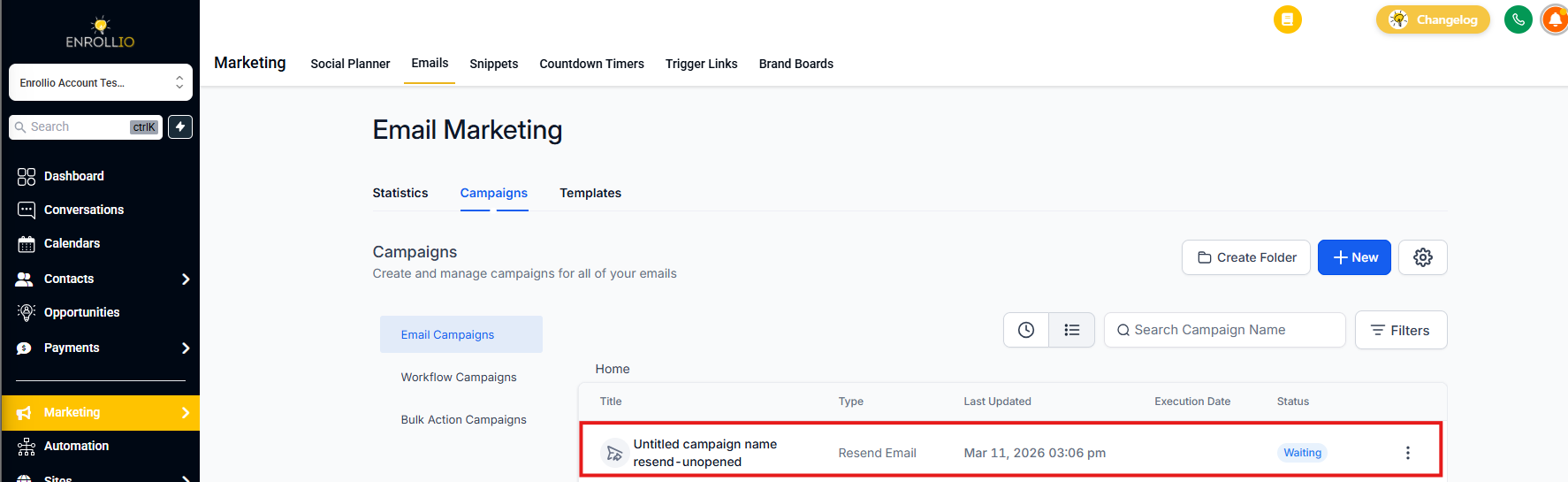
- Spot scheduled resends easily with the "Waiting" label
- Update timing or cancel resends before they send
- Works with batch emails and RSS campaigns
- Eliminates manual follow-up work
How to Set Up Resend Campaigns
Configure resends during campaign creation to re-engage families who didn't see your message.
Steps:
- Create or Open a Campaign – Go to your Email Campaigns dashboard and create a new campaign.
- Click "Send" or "Schedule" – Set up your message as usual.
-
Enable Resend Settings – Toggle the resend option and choose:
- How long to wait before resending (e.g., 2 days)
- A new subject line for the resend
- Send the Campaign – Your resend is now automatically scheduled.
- Track Status – The resend appears as "Waiting" in your campaign list.
-
Modify or Cancel If Needed – Use the three-dot menu to:
- Edit the resend timing
- Cancel the scheduled resend
Resend Support for Batch & RSS Campaigns
You can use resend features with both batch emails and RSS-based campaigns. This gives your recurring content and scheduled announcements a second chance to reach busy families.
Frequently Asked Questions
Can I change the subject line for the resend?
Yes. You can set a custom subject line when configuring your resend settings. This is a great way to grab attention with a different approach.
Where do I see if a resend is pending?
Campaigns with a scheduled resend display "Waiting" in the status column of your campaign list.
What happens if I cancel the original email?
If you cancel the original email, the resend will also be canceled automatically.
Can I resend to parents who clicked but didn't enroll?
This feature only targets unopened emails. For follow-ups based on clicks or other actions, use automations instead.
Next Steps
- Check your campaign analytics to see how resends improve your open rates
- Make resend strategies part of your regular campaign planning
- Test different subject lines for resends to see what resonates with your families