
What is the Collect Family Information Feature?
The Collect Family Information feature lets your Enrollio AI bot gather essential details from prospective families during conversations — like parent names, contact preferences, child's date of birth, and more. This keeps your family records accurate and complete without manual data entry.
Important things to know:
- This action only fills in empty fields — it won't overwrite existing information
- Email and phone numbers update automatically, so you don't need to set up separate actions for those
- You must explicitly tell the bot to ask for information in your prompt, or it won't collect the data
Setting Up Family Information Collection
Step 1: Access the Feature
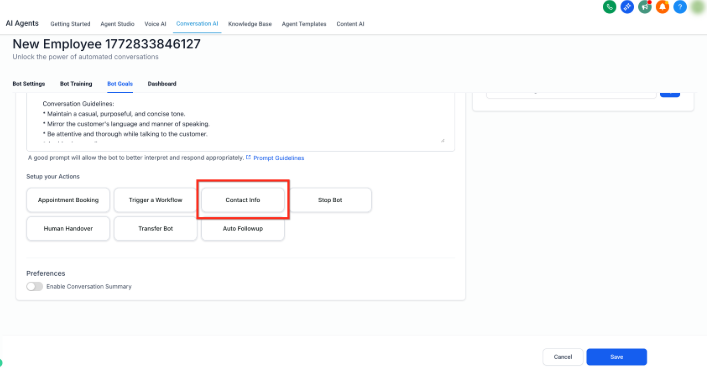
Navigate to the Bot Goals tab and click Add Contact Info.
Note: If you're creating a new bot, you'll need to name it before you can access this feature.
Step 2: Configure the Information Fields
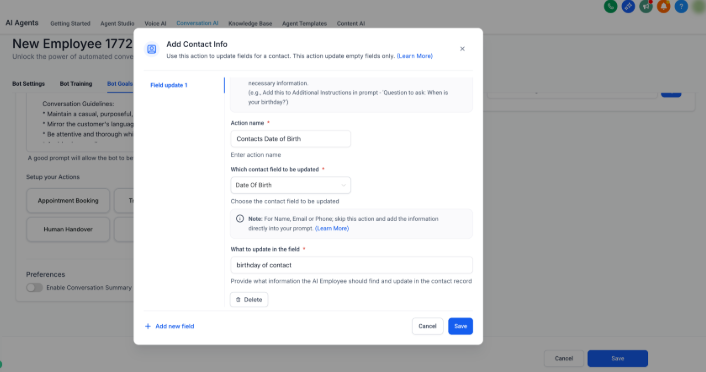
Click Add Contact Info and fill out these details:
Action Name: Give this action a descriptive name so you can recognize it later. Example: "Collect Child's Date of Birth"
Select Field: Choose which field you want to update from the dropdown menu (parent name, business name, date of birth, etc.).
What to Update: Write a short description of what you're collecting. This helps the AI understand context.
- For Date of Birth: "This is the child's birth date"
- For Business Name: "This is the name of the parent's company"
Output Example (Optional): Provide a sample format if needed. For a date of birth, you might enter "5th Jan 2020".
Click Save when you're done.
Writing Your Bot Prompt to Collect Information
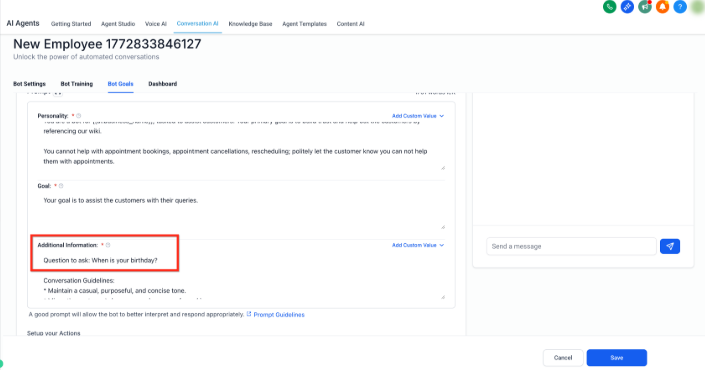
After saving your contact fields, you must tell the bot to actually ask for this information. Here's how to structure your prompt effectively.
Best Practice Example
Let's say you want to collect parent name, email, phone, child's date of birth, and business name before booking a tour. Add this to your bot prompt:
mandatory instruction: before booking a tour always start the conversation by asking these questions one after another
1. Ask the parent their name
2. Ask the parent their email
3. Ask the parent their phone number
4. Ask the parent their child's date of birth
5. Ask the parent their business name (if applicable)
Without these explicit instructions in your prompt, the bot won't ask for the information and the fields won't be filled.
Collecting More Than the Basics
The Add Contact Info action has a limit on how many fields you can map at once. If you need to collect extensive information, use this approach:
- Trigger an automation from your Enrollio AI conversation
- Use Update Contact Field actions inside the automation to populate additional fields based on what the bot learned during the conversation
This gives you unlimited flexibility to capture all the family details you need.
Pro Tips
Keep it conversational: Don't ask for all information at once. Your bot prompt should guide the conversation naturally — collect basic details first, then dive deeper as the conversation progresses.
Match your intake process: Only collect information you actually need for your enrollment process. Asking for too much too soon can overwhelm busy parents.
Test your bot: After setting up your fields and prompts, have a test conversation to make sure the bot asks questions in the right order and saves information correctly.
Frequently Asked Questions
Q: Is there a limit to how many fields I can collect?
A: The Add Contact Info action can map a limited number of fields at one time. For extensive data collection, trigger an automation from your bot conversation and use Update Contact Field actions inside the automation to capture as many details as needed.
Q: Will this overwrite existing family information?
A: No. This feature only fills in empty fields. It won't replace information that's already in your system.
Q: Why isn't my bot asking for the information I set up?
A: You must explicitly instruct the bot to ask for each piece of information in your bot's prompt. The field configuration alone isn't enough — the prompt tells the bot what to actually say and ask.