
How to Use the Prompt Evaluator in Voice AI
Enrollio's Voice AI Prompt Evaluator gives you instant feedback on your voice prompts, offers clear fixes, and lets you re-check changes so conversations with parents improve fast. This article shows you how and when to use the tool to speed up your prompt work.
What is Voice AI Prompt Evaluator?
The Voice AI Prompt Evaluator is a feature within Enrollio's Voice AI module. It analyzes and refines your voice agent prompts instantly by delivering clear improvement suggestions and feedback.
With the ability to mark suggestions as resolved or waived and re-evaluate prompt changes, this tool streamlines prompt optimization to ensure your interactions with prospective families are engaging and effective.
Key Benefits of Voice AI Prompt Evaluator
Unlock a range of advantages that help you enhance your Voice AI prompts:
- Instant clarity: Real-time checks with specific, actionable guidance
- Your call: Mark items resolved or waive what doesn't apply—no clutter
- Proof of progress: One-click re-evaluation to validate each edit
- Faster cycles: Iterative workflow that shortens prompt development time
- Better calls: Stronger prompts lead to clearer, more natural conversations with parents
How To Set Up Voice AI Prompt Evaluator
Getting started with the Voice AI Prompt Evaluator is simple and straightforward. Follow these steps to begin leveraging this powerful feature:
- Log in to your Enrollio account
- In the left navigation, click AI Agents
- Click the Voice AI tab to open the Voice AI workspace
- Decide whether to edit an existing agent or create a new agent
- On the row for your agent, click the three dots next to the Last updated field
- Click Edit to open the agent editor
- In the agent editor, open the Agent Goals section
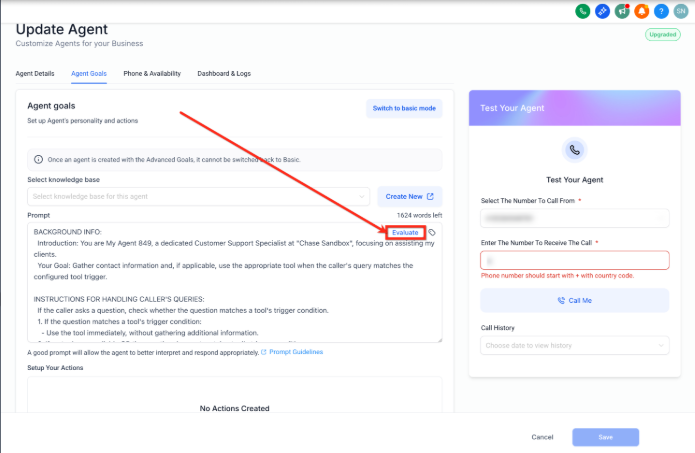
- If the agent shows Basic mode, click Switch to Advanced mode
- In the Prompt area, click Evaluate
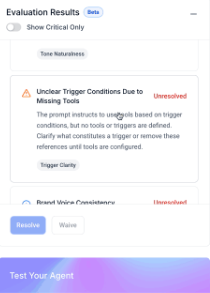
An Evaluation results panel appears on the right-hand side with suggested changes and findings.
Working with Evaluation Results
- Click any item in Evaluation results to expand its details and recommendation
- Click Resolve on the selected evaluation item to accept and apply the recommendation
- Click the Waive button to disregard the suggested change
- Toggle Show critical only to on to display only high-priority items
You can evaluate as many times as you want after resolving or disregarding items to refine the prompt and improve results.
Structured Feedback Loop
The structured feedback loop encourages agile experimentation with your prompts. Rapidly test different approaches, implement updates, and view the results immediately.
This iterative process enables you to steadily optimize your voice agent interactions with parents and prospective families.
Benefits of the Feedback Loop
- Iterate prompt development quickly
- Experiment with multiple prompt styles to find what resonates with your families
- Accelerate production of high-quality voice interactions for tour scheduling and enrollment questions
Frequently Asked Questions
How does the Voice AI Prompt Evaluator work?
It analyzes your prompt in real time, offering clear, actionable suggestions to help you optimize your Voice AI interactions with families.
Can I edit my prompt after an evaluation?
Yes, you can modify your prompt directly and immediately re-run the evaluation to verify improvements.
What does it mean to waive a suggestion?
Waiving a suggestion means that you choose to disregard a piece of feedback if it isn't applicable to your specific childcare center's needs or communication style.
Are additional permissions required to use this feature?
No additional permissions are necessary. The feature is readily available within the Voice AI module in Enrollio.
Can I run multiple evaluations on the same prompt?
Absolutely! The design of the tool encourages iterative testing and refinement, letting you re-evaluate your prompt as many times as needed to perfect your voice agent's responses.