
Managing multiple Voice AI agents doesn't have to mean endless scrolling. Folders keep your Voice AI workspace organized and help you find exactly what you need, fast.
This guide shows you how to create and manage folders for your Voice AI Agents in Enrollio.
What are Folders for Voice AI Agents?
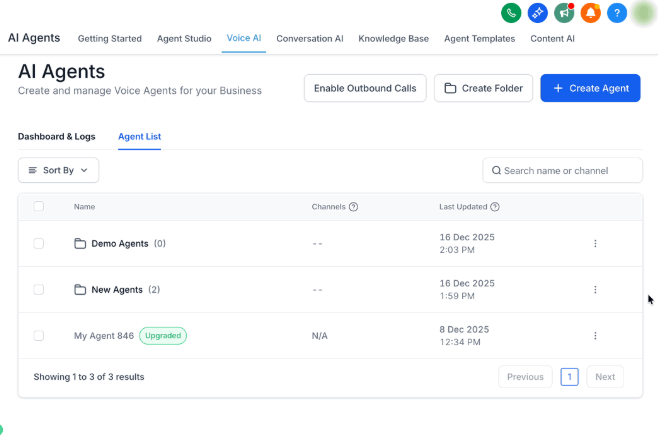
Folders let you organize Voice AI agents into clear categories inside your agent list. Instead of hunting through a long list every time, you can jump straight to the category you need.
This structure makes managing multiple agents easier and reduces the risk of accidentally editing or deleting the wrong one. You'll find Folders under AI Agents > Voice AI > Agent List.
Why Use Folders?
- Stay organized: Group agents by purpose—enrollment calls, tour reminders, waitlist follow-ups, or even by location if you run multiple centers
- Save time: Navigate directly to the folder you need instead of scrolling through everything
- Scale confidently: Use bulk actions to move or delete multiple agents or folders at once
- Work your way: Switch between folder-first or agent-first views depending on your task
Creating a New Folder
Start organizing by creating folders and assigning agents right away. Here's how:
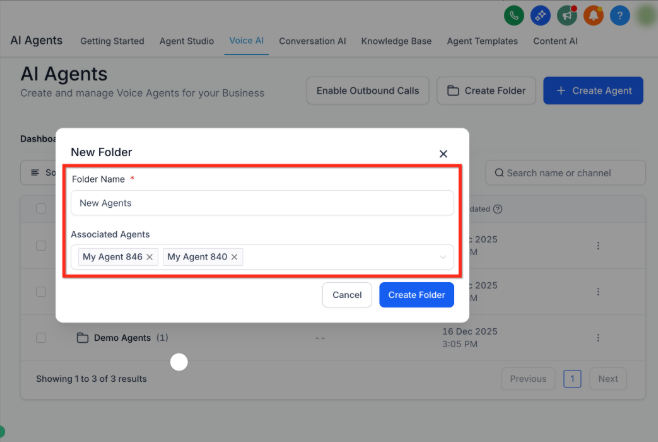
- Click Create Folder from your Voice AI Agent List
- Enter a Folder Name (like "Tour Reminders" or "Waitlist Follow-Up")
- Select any existing Associated Agents you want to move into this folder
- Click Create Folder
Your selected agents will now appear inside the new folder.
Managing Your Folders
Keep your folders current by moving agents around, renaming folders, or removing ones you no longer need.
Move an Agent to a Different Folder
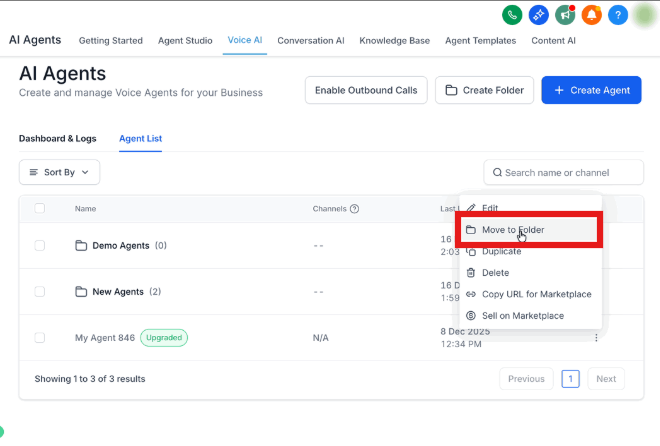
- Click the three-dot menu (⋮) next to the agent
- Select Move to Different Folder
- Choose the destination folder from the Available Folders dropdown
- Click Move Agent
The agent transfers instantly to the new folder.
Delete a Folder
- Click the three-dot menu (⋮) next to the folder name
- Select Delete
Important: Deleting a folder only removes the folder itself. Any agents inside return to your main agent list—they're not deleted.
Rename or Edit a Folder
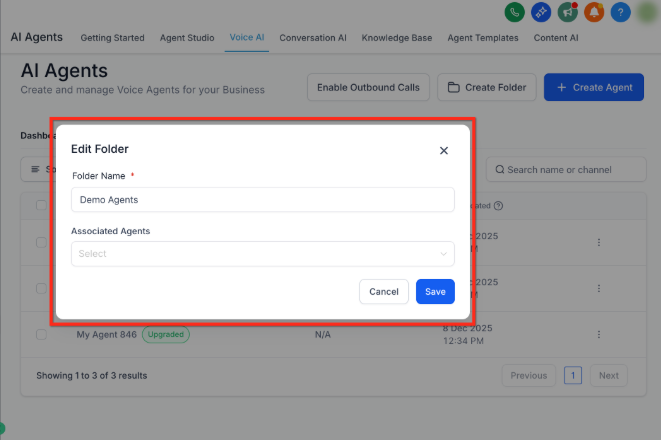
- Click the three-dot menu (⋮) next to the folder
- Select Edit
- Update the Folder Name or change which agents are in the folder using Associate Agents
- Save your changes
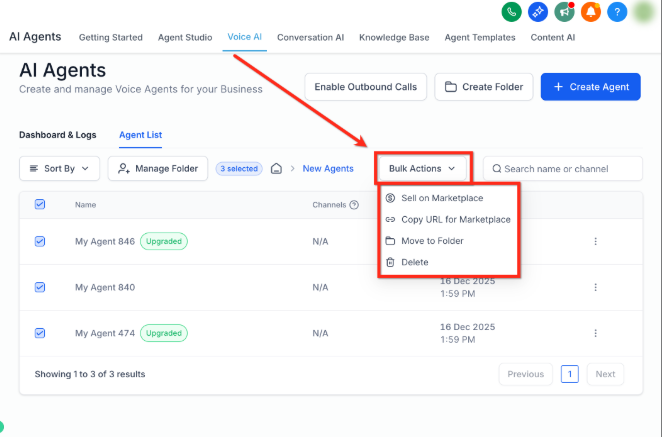
Using Bulk Actions
When you're managing lots of agents or reorganizing your entire structure, bulk actions save serious time.
With bulk actions, you can:
- Delete multiple agents or folders at once
- Move several agents to a new folder in one step
- Copy marketplace URLs for multiple agents
How to Use Bulk Actions
- Select multiple agents or folders using the checkboxes
- Click Bulk Actions
- Choose your action from the dropdown
- Confirm your selection
Customizing Your Agent List View
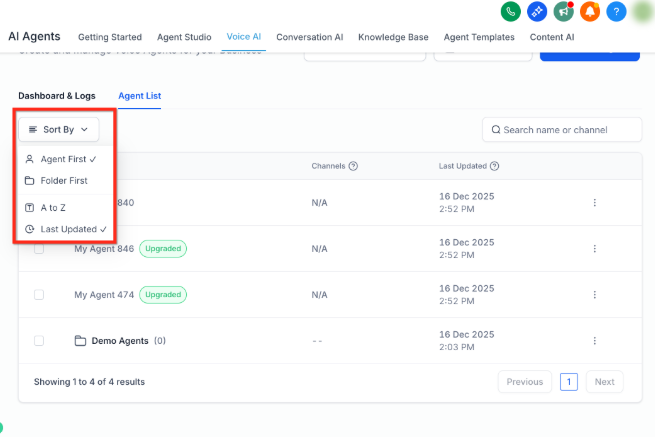
You can adjust how your agent list displays to match your workflow.
Grouping: Switch between grouped (folder-first) or flat (agent-first) views using the sort options. Use folder view when organizing; switch to agent view when you need to see everything at once.
Sorting: Sort by last updated or name for both agents and folders. This helps you quickly find recently modified agents or locate something alphabetically.
Frequently Asked Questions
Can an agent belong to multiple folders?
No. Each agent can only be in one folder at a time. If you move an agent to a new folder, it automatically leaves its previous folder.
How many Voice AI agents can I create?
You can create up to 100 agents in your Enrollio account.
What happens to agents when I delete a folder?
The agents aren't deleted—they return to your main agent list. Only the folder structure is removed.
Does search work across folders?
Search is context-aware. When you're viewing a folder, search looks inside that folder. When you're on the main agent list, search only finds agents that aren't in folders. Open a folder first to search its contents.
When I create a new agent while viewing a folder, where does it go?
The new agent is automatically saved in whichever folder you currently have open. If you're on the main list (not in a folder), the agent stays on the main list.