
Business Profile Settings
The Business Profile section is where you configure your childcare center's core information—business name, address, contact details, and platform-wide settings. Taking a few minutes to set this up correctly ensures Enrollio works smoothly for your enrollment process, parent communications, and daily operations.
What is the Business Profile?
Your Business Profile is the central hub for your account settings in Enrollio. This is where you store your center's information and configure settings that apply across your entire account—from how parent contacts are handled to your time zone and communication preferences.
Setting up this section properly is critical to how Enrollio operates for your childcare business. We'll walk you through each section so you understand exactly what to configure and why it matters.
Where Do I Find the Business Profile?
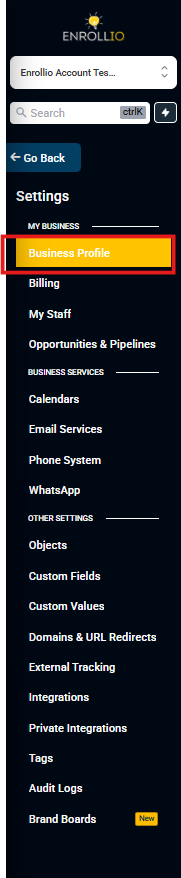
Navigating to your Business Profile takes just a few clicks:
- Make sure you're in your Enrollio account
- Click Settings in the left navigation menu
- The Business Profile is the first option in the Settings menu and appears by default when you open Settings
What's in the Business Profile Settings?
Business Profile Settings is organized into 7 sections. Each section controls different aspects of how your account operates:
General Information
This section stores your brand identity and key account details—your logo, business names, contact email and phone, branded domain, website, childcare niche, default currency, and API key.
Learn more about General Information settings
Business Physical Address
Captures your childcare center's official address and locale settings, including your Business Time Zone, Platform Language, and Outbound Communication Language. These settings control how dates and numbers are formatted in parent communications.
Learn more about Business Physical Address settings
Business Information
Defines your legal entity type, childcare industry classification, registration ID/number, and regions of operation. This information is used for compliance, approvals, and reporting.
Learn more about Business Information settings
Authorized Representative
Records a designated person (name, title, email, phone) who can verify your business during compliance reviews and carrier approvals for messaging services.
Learn more about Authorized Representative settings
General
Contains platform-wide behavior toggles that affect duplicate parent records, booking time zones, verification, compliance defaults, and communication behavior.
Learn more about General settings
Contact Deduplication Preferences
Controls whether duplicate parent/family records are allowed in your system. You can set the primary and secondary fields (Email, Phone) used to match new submissions to existing families in your database.
Learn more about Contact Deduplication Preferences
Enable / Disable Deprecated Features
Shows or hides legacy features in your account. This helps you audit or migrate old assets while standardizing on modern features like Automations.
Learn more about Enable / Disable Deprecated Features
Frequently Asked Questions
Do these settings apply across all users in my account?
Yes. Business Profile settings are account-wide and apply to everyone on your team, though some pages can display in a staff member's personal time zone.
Can I change these settings later?
Absolutely. You can update these settings anytime as your childcare center's needs change. Just be sure to test any changes—especially around time zones and communication settings—to make sure everything still works as expected.
Related Articles
- Business Profile Settings - General Information
- Business Profile Settings - Business Physical Address
- Business Profile Settings - Business Information
- Business Profile Settings - Authorized Representative
- Business Profile Settings - General
- Contact Deduplication Preferences
- Business Profile Settings - Enable / Disable Deprecated Features