
Media Storage & File Upload Limits
The Media Library stores your marketing assets like images, videos, and documents. Different features in Enrollio have different limits on file types and sizes to ensure everything loads quickly for parents browsing your enrollment pages.
Understanding Files and the Media Library
Files are data formatted in specific ways, identified by extensions like .png, .pdf, or .mp4. Each feature in Enrollio can handle certain file types and sizes based on how they're used.
For example, your enrollment page builder can display a .png image but might not support a .svg file. It can handle a 1MB photo but not a 1GB video file.
Why File Size and Type Matter
Even when a file is supported, its display size matters. A logo at 50px by 200px fits perfectly in your header, but the same logo stretched to 500px by 500px overwhelms the page.
Native resolution also affects quality. A tiny 16px by 16px icon blown up to 500px looks pixelated and unprofessional. SVG files are the exception—they're drawn with mathematical formulas instead of pixels, so they look sharp at any size.
Display Settings
When a file doesn't fit its space perfectly, you can adjust alignment (left, right, center) and how it fills the area (stretch, tile, crop). These aren't part of the file itself—they're display settings that help your content look polished.
The Media Library helps you manage these assets and their complexity in one organized place.
Using the Media Library
Navigate to Media Storage to browse and preview your files.
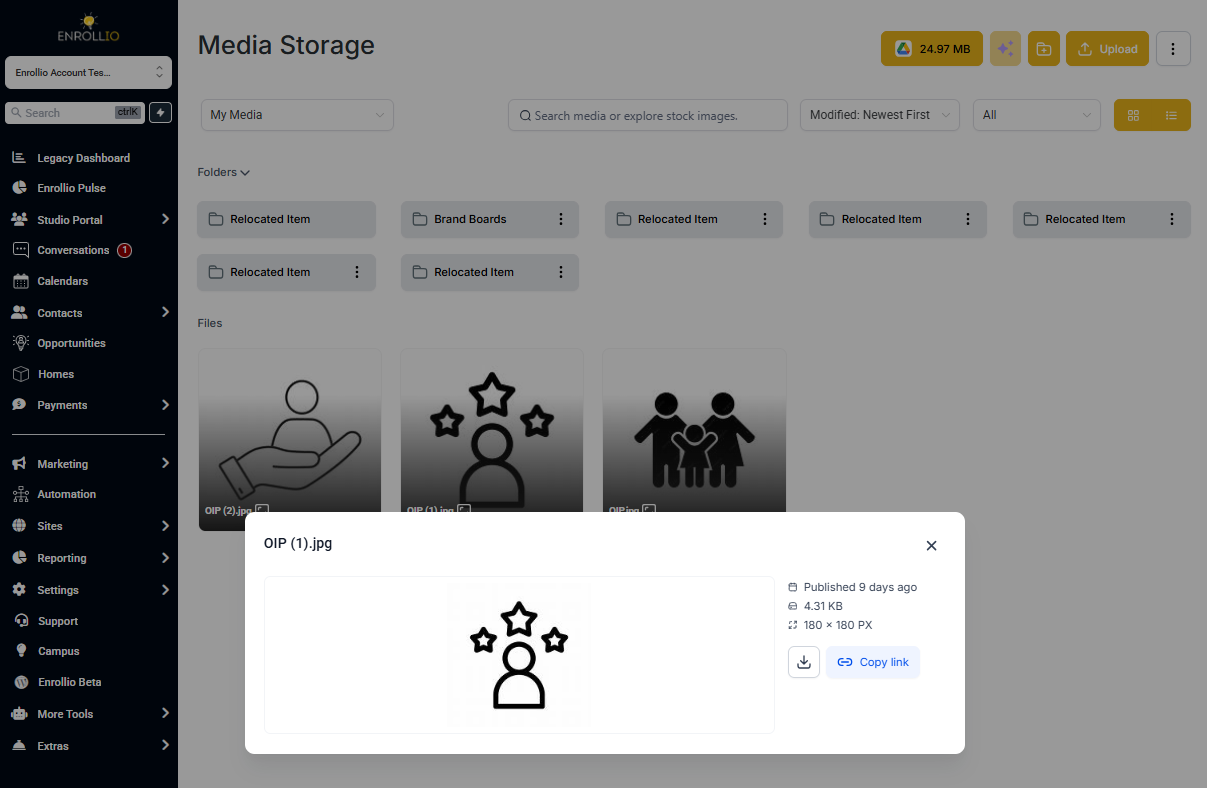
Each file shows these details:
- Filename: The unique name identifying your file
- File Extension: The suffix (like .png) that tells Enrollio how to read the file
- Upload Date: When you added the file to your library
- File Size: How much storage space it uses (measured in kb, MB, or GB)
- Dimensions: The pixel width and height of images and videos
File Upload Limits by Feature
Different features in Enrollio have different file size limits based on how they're used. Here's what each feature supports:
Images
| Format | Extensions | Media Library | Social Planner | Enrollment Pages | Custom Forms |
|---|---|---|---|---|---|
| PNG | .png | 100MB | 10MB | 100MB | 50MB |
| JPEG | .jpg, .jpeg, .jfif | 100MB | 10MB | 100MB | 50MB |
| GIF | .gif | 100MB | 10MB | 100MB | 50MB |
| WEBP | .webp | 100MB | 10MB | 100MB | 50MB |
| SVG | .svg | 100MB | 10MB | 100MB | 50MB |
| TIFF | .tif, .tiff | 100MB | 10MB | 100MB | 50MB |
Videos
| Format | Extensions | Media Library | Social Planner | Enrollment Pages | Custom Forms |
|---|---|---|---|---|---|
| MP4 | .mp4 | 4GB | 1GB | 4GB | 50MB |
| MOV | .mov, .qt | 4GB | 1GB | 4GB | 50MB |
| AVI | .avi | 4GB | 1GB | 4GB | 50MB |
| WebM | .webm | 4GB | 1GB | 4GB | 50MB |
| WMV | .wmv | 4GB | 1GB | 4GB | 50MB |
Audio
| Format | Extensions | Media Library | Social Planner | Enrollment Pages | Custom Forms |
|---|---|---|---|---|---|
| MP3 | .mp3, .mpeg | 100MB | 100MB | 100MB | 50MB |
| WAV | .wav | 100MB | 100MB | 100MB | 50MB |
| M4A | .m4a | 100MB | 100MB | 100MB | 50MB |
| OGG | .oga, .ogg | 100MB | 100MB | 100MB | 50MB |
Documents
| Format | Extensions | Media Library | Social Planner | Enrollment Pages | Custom Forms |
|---|---|---|---|---|---|
| 100MB | 100MB | 100MB | 50MB | ||
| Word | .doc, .docx | 100MB | 100MB | 100MB | 50MB |
| Excel | .xls, .xlsx | 100MB | 100MB | 100MB | 50MB |
| PowerPoint | .ppt, .pptx | 100MB | 100MB | 100MB | 50MB |
| Text | .txt, .rtf | 100MB | 100MB | 100MB | 50MB |
| CSV | .csv | 100MB | 100MB | 100MB | 50MB |
Other File Types
| Type | Extensions | Media Library | Social Planner | Enrollment Pages | Custom Forms |
|---|---|---|---|---|---|
| ZIP Archives | .zip | 100MB | 100MB | 100MB | 50MB |
| Fonts (TTF) | .ttf | 100MB | 100MB | 100MB | 50MB |
| Fonts (OTF) | .otf | 100MB | 100MB | 100MB | 50MB |
| Fonts (WOFF) | .woff, .woff2 | 100MB | 100MB | 100MB | 50MB |
| vCard | .vcf | 100MB | 100MB | 100MB | 50MB |
Browser Compatibility
All supported formats work across Chrome, Firefox, and Safari. Most files display with inline previews where applicable. Some formats may appear as downloadable files depending on your browser and device settings.
💡 Pro Tip: Use MP4 for videos and PNG or JPEG for photos—they're universally supported and load quickly for parents browsing on mobile devices.
Collecting Files from Parents
You can collect files from parents through custom forms. When building a form, add a File Upload field to let parents submit documents like immunization records, emergency contact forms, or registration paperwork.
File upload fields on forms have a 50MB limit per file to ensure smooth submission on mobile devices.