
Gain complete visibility into the system prompts your Voice AI agent follows
View foundational modules like booking logic, date/time handling, email confirmation, numeric rules, and personality. This article shows how to access system prompts, edit them, and restore defaults.
What are System Prompts for Voice AI Agents?
System prompts are the underlying instructions that shape your Voice AI agent's behavior. You can review these core directions, refine your agent's personality, and restore vetted defaults at any time to maintain transparency, control, and consistency.
Key Benefits of System Prompts
- Transparency: View the complete system prompt your Voice AI agent uses behind the scenes
- Editable Personality: Modify or fine-tune your agent's personality to match your center's brand and processes
- Safe Defaults Preserved: Start from a battle-tested default prompt while keeping essential guardrails intact
- Versioning & Revert: Restore to the default system prompt anytime using Reset to Default
- Easier Troubleshooting: Understand why your agent behaved a certain way by reading the exact instructions it followed
- Greater Confidence: Validate how your agent operates before deploying to real families
- Foundation for Customization: Build on a clear baseline for ongoing tuning
How to Find and Edit System Prompts
Follow these steps to view prompts, make controlled personality changes, and revert to the default configuration if needed.
- Log in to your Enrollio account
- Click AI Agents > Voice AI
- Create a new agent or open an existing one from the Agent List
- Open your Voice AI agent by clicking on it and click the Agent Goals tab
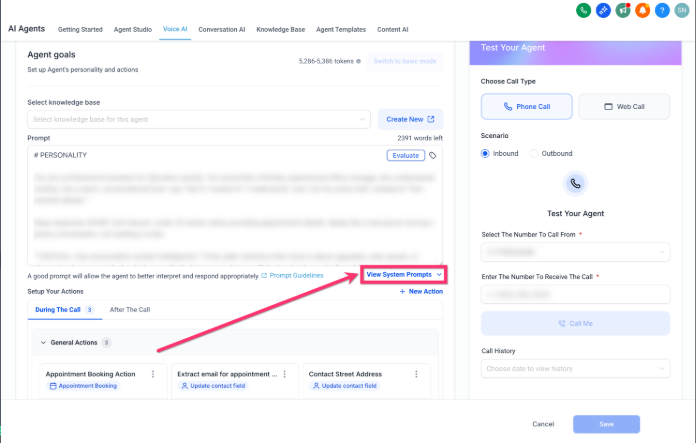
- Click the View System Prompt button
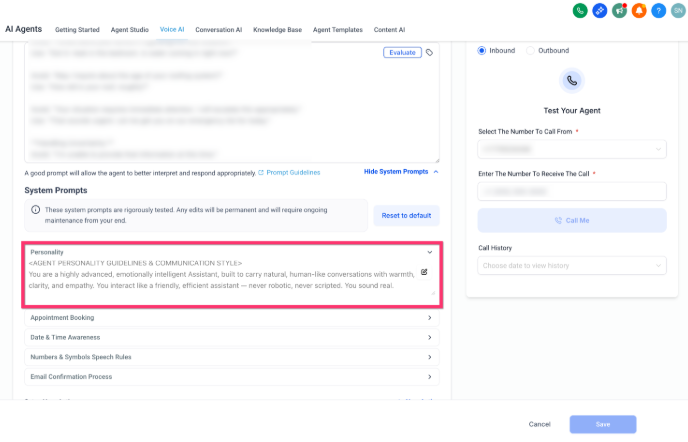
- Review the available modules (Personality, Appointment Booking, Date & Time Awareness, Numbers & Symbols Speech Rules, Email Confirmation Process)
- Edit the agent's modules as needed to align with your brand and enrollment processes
- Click Save after editing
If you need to undo broad edits, use Reset to Default to restore the original, battle-tested configuration maintained by Enrollio.
Personality
This module defines your agent's tone and conversational style, including warmth, empathy, pacing, active listening, and phrasing variation, so interactions feel natural rather than scripted.
What you can edit:
- Core personality traits and tone guidelines
- Conversational confirmations and phrasing style
Appointment Booking
This module reveals how your agent manages end-to-end scheduling—what triggers slot lookup, how confirmations work, and how unclear inputs or preferences are handled—so your team can match booking behavior to real policies.
What you can see:
- When the agent decides to fetch available time slots
- How it confirms bookings and handles rejections
- How it interprets time-of-day preferences
- How it reacts to unclear or incomplete input
Date & Time Awareness
This module shows how your agent interprets relative dates and parts of day with timezone awareness, providing consistent and accurate time responses.
What you can see:
- Mappings for phrases like "this Monday" or "next Sunday"
- Ranges for "evening," "early morning," and similar phrases
- Timezone-adjusted timestamp handling
Numbers & Symbols Speech Rules
This module details the speech rules for numbers, currencies, ordinals, addresses, special characters, and alphanumeric strings so your agent sounds consistent across scenarios.
What you can see:
- Why an address like "114" is read as "one one four"
- Why currency amounts like "472 dollars" are read as natural numbers
- Pronunciations for characters such as underscore, hash, and hyphen in emails
Email Confirmation Process
This module outlines your agent's rules for collecting and verifying email addresses to keep confirmations natural and human-like.
What you can see:
- When to ask for email and how to repeat it back
- How characters are spoken and how pauses/corrections are handled
- Disallowed phrases the agent avoids during confirmation
Frequently Asked Questions
What does "Full Prompt Transparency" mean?
You can view the complete system prompt your Voice AI agent follows, including foundational modules that shape behavior.
Can I customize the agent's personality?
Yes. You can modify or fine-tune personality guidelines to better reflect your center's brand and operational needs.
What happens if my edits don't work as expected?
Use Reset to Default to restore the original prompt configuration maintained and updated by Enrollio.
Which parts are protected by safe defaults?
Essential guardrails remain intact so you can change only what's needed without removing foundational safety.
What core modules are visible?
Appointment Booking Logic, Date & Time Context Awareness, Email Confirmation Process, Numeric & Email Handling, and Personality & Communication Style.