
Purpose
This guide explains Enrollio’s update that helps your studio stay compliant with messaging regulations by automatically adding opt-out instructions and sender information to ongoing conversations. With this feature, you can protect your business, maintain deliverability, and build trust with families—all without extra effort.
What It’s For
Dance studio owners often send ongoing text or messaging campaigns to students and parents. Over time, regulations like TCPA, CTIA, GDPR, and CCPA require that businesses include opt-out language and sender information at regular intervals. Forgetting to do this can cause deliverability issues or even penalties. Enrollio now handles this for you automatically.
Key Features & Benefits
-
Opt-Out & Sender Info on Autopilot – Every conversation automatically includes opt-out language and your business name at regular intervals, not just the first message.
-
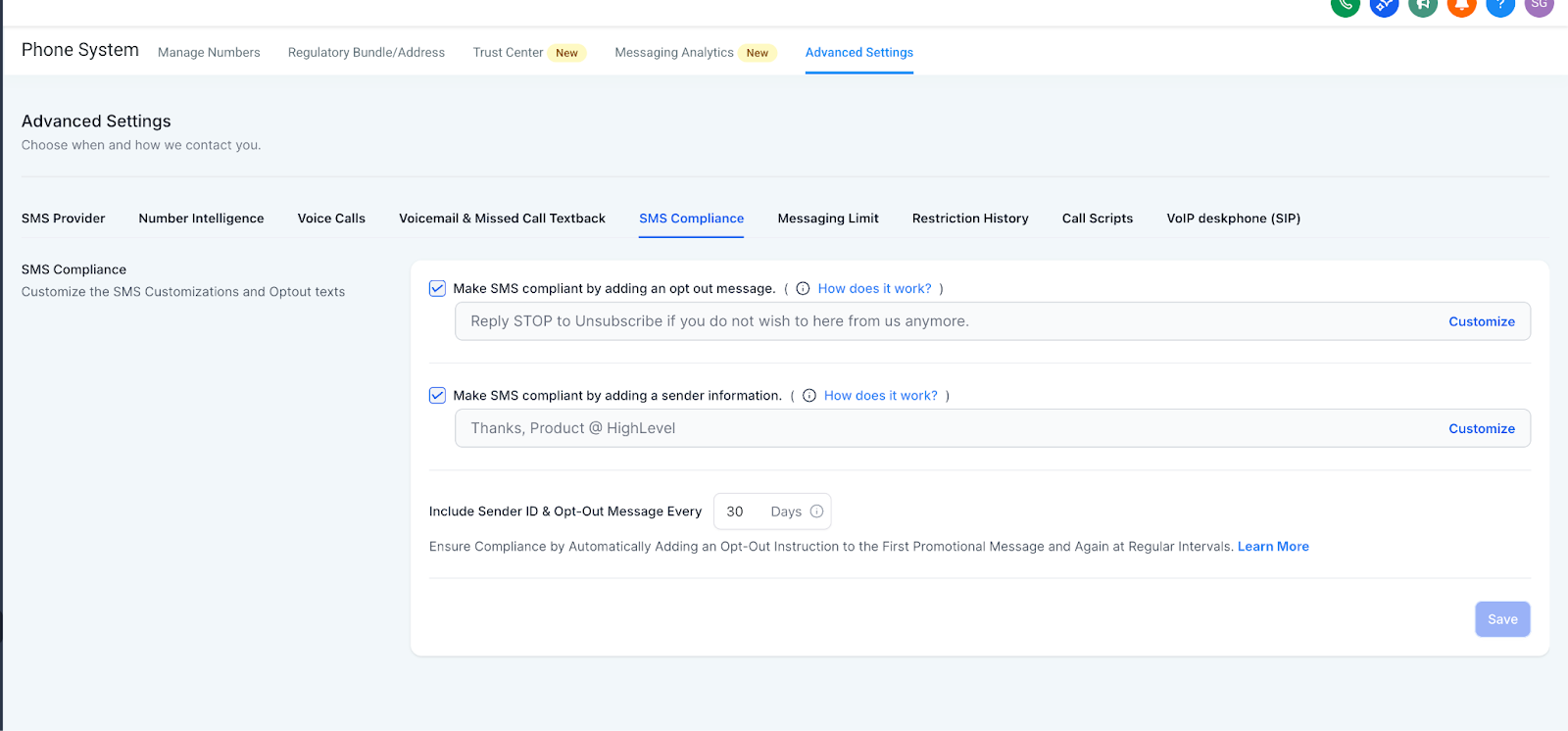
Adjustable Frequency – You can set how often the info is added (from every 1 to 60 days). By default, it’s set to 30 days.
-
Built-In Protection – Works in the background so every contact receives clear opt-out details.
-
No Manual Effort Needed – Saves time and removes the risk of forgetting compliance steps.
Step-by-Step Instructions
-
Access Messaging Settings
- Go to your Enrollio account and open the Messaging Settings for your account.
- Go to your Enrollio account and open the Messaging Settings for your account.
-
Set Frequency
- Locate the Opt-Out & Sender Info option.
- Adjust how often the language should be automatically included (default is every 30 days).
- Locate the Opt-Out & Sender Info option.
-
Save Changes
- Once saved, Enrollio will handle the rest for all ongoing conversations.
- Once saved, Enrollio will handle the rest for all ongoing conversations.
Why It Matters
-
Avoid Risks – Stay compliant with industry regulations automatically.
-
Improve Deliverability – Meet carrier expectations for long-term conversations.
-
Build Trust – Keep communication transparent with students and parents.
-
Save Time – No more manually adding opt-out text.
-
Protect Every Message – Ensure all campaigns, no matter the size, stay compliant.
Notes / Tips
Even if you don’t change settings, the 30-day default keeps you covered from day one.
Support Reminder
If you need help adjusting your settings or learning best practices for compliance, please reach out to support@enrollio.ai and our team will be happy to help.