
What's New?
You can now automatically include Stripe transaction fees in parent tuition payments. This update ensures your studio receives the full tuition amount after Stripe’s processing fees — so your revenue matches what you expect.
How It Works?
When a parent pays tuition, the transaction fee is added on top of the total tuition.
Example: If tuition is $100 and the Stripe fee is 2.9%, the parent will see a total of $102.90 at checkout.
- Parents will only see the total amount due — the fee won’t appear as a separate line item.
- In your Studio Portal, under Payments → Transactions, you’ll see the full amount collected (tuition + transaction fee).
- Once your fee percentage is set, all future tuition payments will automatically include it.
The standard Stripe rate is 2.9%, but you can adjust this rate to fit your studio’s needs.
Important Legal Considerations
While passing along these fees (often called "surcharging") is a common practice in many regions, it is not permitted everywhere. Local laws vary widely, and non-compliance can result in fines or legal issues. We strongly recommend consulting a legal expert or reviewing regulations in your operating area before enabling this feature.
Where Surcharging Is Prohibited or Restricted
Based on current regulations, here are some key examples (as of October 2025—always verify for updates):
| Region/Country/State | Status | Details |
|---|---|---|
| European Economic Area (EEA), including EU countries | Prohibited for consumers | Under PSD2, merchants cannot add extra fees for credit/debit card payments to protect consumers. Applies to B2C transactions; B2B may have exceptions. |
| United Kingdom | Prohibited for consumers | Similar to EEA post-Brexit; no surcharges on consumer card payments. |
| Connecticut (US) | Prohibited | State law bans credit card surcharges entirely. |
| Massachusetts (US) | Prohibited | State law bans credit card surcharges entirely. |
| California (US) | Allowed with restrictions | Recent legal changes permit surcharges, but with strict disclosure requirements and caps (e.g., not exceeding processing costs). |
| Florida (US) | Allowed with restrictions | Legal developments allow surcharges under certain circumstances, including notifications. |
| New York (US) | Allowed with restrictions | Legal rulings permit surcharges with strict disclosure requirements. |
| Japan | Prohibited | Merchant agreements and laws explicitly ban surcharges on credit card payments. |
In the United States, surcharging is legal in most states (e.g., capped at processing fees in many, with disclosure required), but the prohibited states above are exceptions. Other countries like Canada and Australia allow it with caps and transparency rules, though specifics vary.
For a full list or specifics, check Stripe's guidelines or your local consumer protection authority.
Our Policy on Risk and Compliance
Enrollio provides this feature as a convenience, but we do not assume any risk related to its use. You are solely responsible for ensuring compliance with all applicable laws, credit card network rules (e.g., Visa, Mastercard), and Stripe's terms in your jurisdiction. If a surcharge violates local rules, you may face chargebacks, disputes, or penalties—we cannot intervene or cover those costs.
If you're unsure, start with a test transaction in a compliant area or disable the feature until you've confirmed legality.
How to Enable It
-
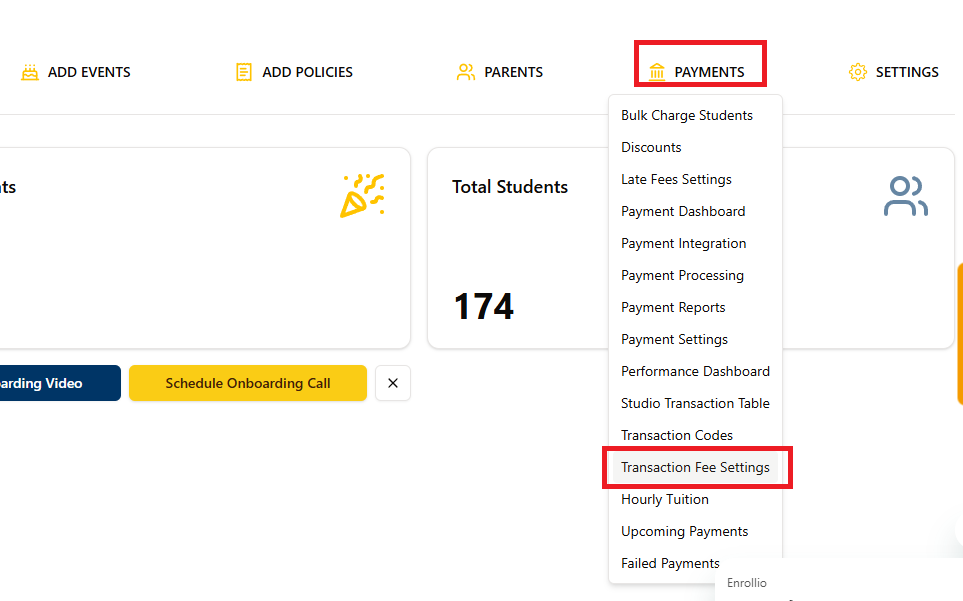
Go to Studio Portal → Payments → Transaction Fee Settings
-
Toggle “Pass Transaction Fees to Parents” to On
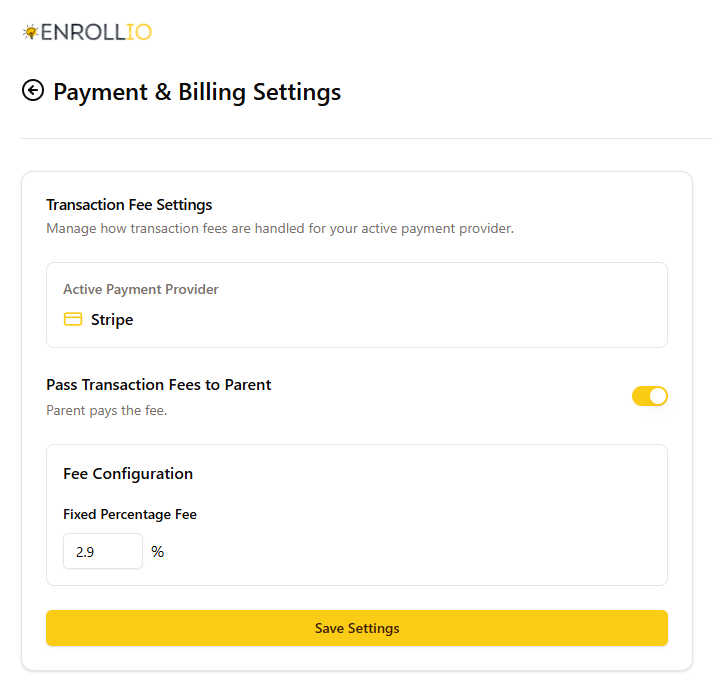
Set your preferred Fixed Percentage Fee (e.g., 2.9%)
Tip for Studio Owners
It’s a good idea to let families know that upcoming tuition payments will now include a small Stripe processing fee. This helps maintain transparency and sets clear expectations for parents when checking out.
Support
If you need help setting up or adjusting your transaction fee settings, contact us at support@enrollio.ai.